The live samples are now found here:
http://plexityhide.azurewebsites.net/
Updated builds found here https://plexityhide.com/buildserver/
and on Nuget

The live samples are now found here:
http://plexityhide.azurewebsites.net/
Updated builds found here https://plexityhide.com/buildserver/
and on Nuget
When you drag a time item outside of the screen – in the time direction – you auto scroll in time. But when dragging the time item out of screen to the top or bottom we should auto scroll rows.
This needs a new event since we are not really sure exactly how the Gantt Rows are grouped to form a Gantt chart – you can use any control like a DataGrid or a ListView to group the rows.
This is one example of how to implement row scrolling with the new event:
    private void _GanttControl_OnConsiderRowAutoScroll(object sender, OnConsiderRowAutoScrollArgs e)
    {

      var trans= e.TimeItem.TransformToVisual(_GanttControl);
      var posInGanttCoords = trans.Transform(new Point(0, 0));
      if (posInGanttCoords.Y < _GanttControl.DateScaler.ActualHeight)
      {
        // scroll up
        ControlTemplate template = this._ItemsControl.Template;
        ScrollViewer scrollViewer = (ScrollViewer)template.FindName("_ScrollViewer", this._ItemsControl);
        scrollViewer.LineUp();
        e.ScrollDoneReMeassure = true;
      }

      if (posInGanttCoords.Y > _GanttControl.ActualHeight)
      {
        //scroll down
        ControlTemplate template = this._ItemsControl.Template;
        ScrollViewer scrollViewer = (ScrollViewer)template.FindName("_ScrollViewer", this._ItemsControl);
        scrollViewer.LineDown();
        e.ScrollDoneReMeassure = true;
      }

    }
In this particular case the Gantt is held in a ItemsControl that has a scrollviewer that has the name of _ScrollViewer. So the new Event OnConsiderRowAutoScroll is called whenever the TimeItem is dragged of the GanttRow.
Then we need to check if the TimeItem should initiate an AutoScroll – and if it does we need to scroll and set the flag e.ScrollDoneReMeassure=true – this way the Gantt knows that the worlds has changed.
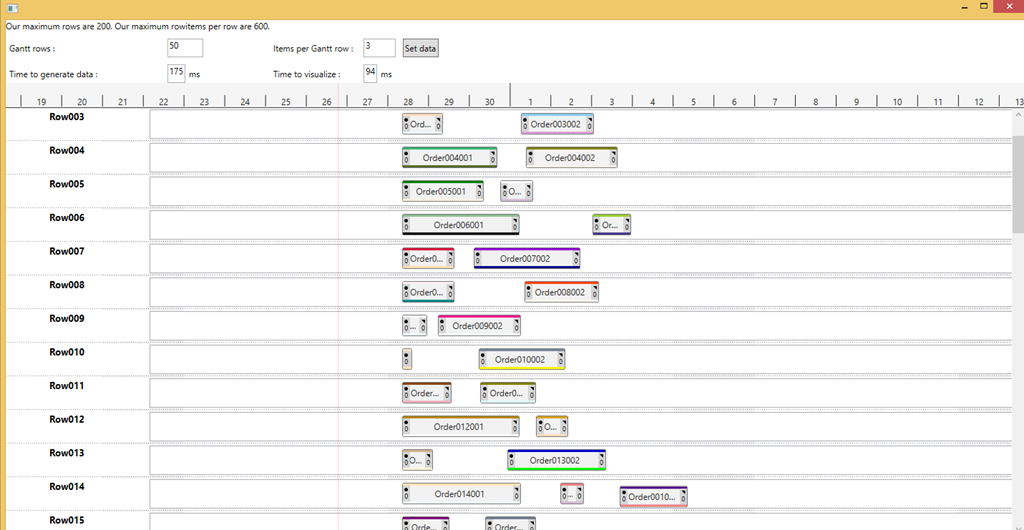
This is an example on how to use the Gantt chart in WPF
It is easy to make the WPF Gantt slow, just bog it down with lots of time items that has lots of details (complex internal markup).
This article is about how to make the WPF Gantt really fast.
There are two important things to optimize:
1. The Gantt rows
2. The Time Items
The Gantt rows can be optimized by limiting their rendering to only show the ones on screen. This is handled by standard WPF Virtualization implemented by VirtualizingStackPanel.
Example:
If you have your Gantt Rows in a Items control (if it is a tree view then it is really one items control per node):
      <ItemsControl x:Name="_ItemsControl"
                    VirtualizingStackPanel.IsVirtualizing="True"
                    VirtualizingStackPanel.VirtualizationMode="Standard"
    ScrollViewer.CanContentScroll="True"

                    ItemTemplate="{StaticResource _GanttRowTemplate}"
                    ItemsSource="{Binding Path=Resources}">
                <ItemsControl.ItemsPanel>
                    <ItemsPanelTemplate>
                        <VirtualizingStackPanel />
                    </ItemsPanelTemplate>
                </ItemsControl.ItemsPanel>
                    <ItemsControl.Template>
          <ControlTemplate>

            <Border HorizontalAlignment="Stretch"
                    BorderThickness="{TemplateBinding Border.BorderThickness}"
                    Padding="{TemplateBinding Control.Padding}"
                    BorderBrush="{TemplateBinding Border.BorderBrush}"
                    Background="{TemplateBinding Panel.Background}">
              <ScrollViewer x:Name="_ScrollViewer"
                            HorizontalAlignment="Stretch"
                            HorizontalContentAlignment="Stretch"
                            VerticalAlignment="Stretch"
                            VerticalContentAlignment="Stretch"
                            IsDeferredScrollingEnabled="True"
                            CanContentScroll="True"
                            Padding="{TemplateBinding Control.Padding}"
                            ScrollChanged="ScrollViewer_ScrollChanged"
                            Focusable="False">
                <ItemsPresenter HorizontalAlignment="Stretch"
                                VerticalAlignment="Stretch" />
              </ScrollViewer>
            </Border>
          </ControlTemplate>
        </ItemsControl.Template>
      </ItemsControl>
Doing this will stop WPF from wasting time on stuff that is not currently on screen. And WPF will create the GanttRows when scrolled into view.
The Time items are not in a StackPanel so we need to use a different technique. We need a way to decide if a should be on screen or not.
We do this by implementing the event OnVirtualizeTimeItemCheck. In this event we get information about the bound object – that YOU know how to interpret – and the ability to say if it should be visible or not. We inform the Gantt that it should not be visible by setting e.SuggestedVisibility to Collapsed.
    void _GanttControl_OnVirtualizeTimeItemCheck(object sender, OnVirtualizeTimeItemCheckArgs e)
    {
      if (e.TimeItemObject is WpfApplication10.Task)
      {
        var t=e.TimeItemObject as WpfApplication10.Task;
        if (t.Begin < e.VisibleAreaStop && t.End > e.VisibleAreaStart)
          e.SuggestedVisibility = System.Windows.Visibility.Visible;
        else
          e.SuggestedVisibility = System.Windows.Visibility.Collapsed;
      }
    }
The easiest way to decide if it should be on screen is like above: If the start is smaller than stop of view AND the stop is bigger than start of view. This covers the cases when time items are partly on screen, and when time items span the whole screen and beyond.
If you have large datasets like 1000 rows and 1000 time items per row – you really have to follow these guidelines. But you see good effects long before that.
Below 1 million Time items – Gantt still renders fast.
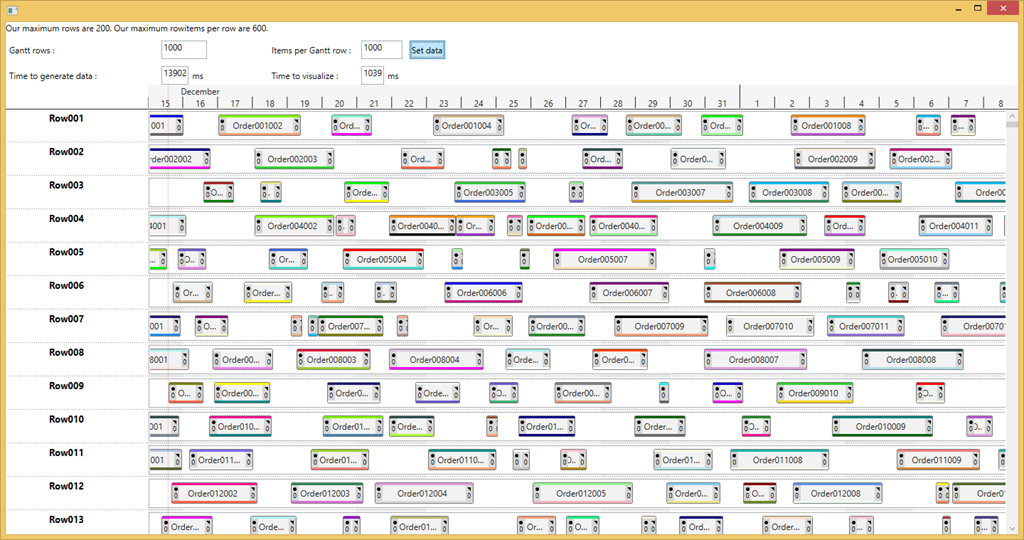
If you want your GanttRow to increase in height to make room for collided time items; read on.
Your row looks something like this:
<HierarchicalDataTemplate x:Key=”RowInfoTemplate” ItemsSource=”{Binding SubNodes}” ItemTemplate=”{StaticResource SubRowInfoTemplate}”>
<Grid MinHeight=”25″>
<Grid.ColumnDefinitions>
<ColumnDefinition ></ColumnDefinition>
<ColumnDefinition ></ColumnDefinition>
</Grid.ColumnDefinitions>
<ph:TreeViewMultiColumnRow MultiColumnCoordinator=”{Binding Source={StaticResource MCC}}” LevelReduce=”16″>
<Grid.ColumnDefinitions>
<ColumnDefinition></ColumnDefinition>
<ColumnDefinition></ColumnDefinition>
</Grid.ColumnDefinitions>
<TextBlock Text=”{Binding Text}” Grid.Column=”0″></TextBlock>
<TextBlock Text=”{Binding Text}” Grid.Column=”1″></TextBlock>
</ph:TreeViewMultiColumnRow>
<Canvas >
<ph:GanttRow
FollowDateScalerPosition=”True”
Canvas.Top=”-3″ BorderThickness=”0″ Background=”Transparent”
IncreaseRow_StartHeight =”30″ IncreaseRowHeightOnCollision=”True” CollisionTimeItemOffset=”20″
ItemsSource=”{Binding Items}” ItemTemplate=”{StaticResource SpanTimeItem}”
OnUserDrawTimeItem=”GanttRow_OnUserDrawTimeItem”
OnGanttRowMinHeightChange=”GanttRow_OnGanttRowMinHeightChange”></ph:GanttRow>
</Canvas>
</Grid>
</HierarchicalDataTemplate>
Notice the the GanttRow is enclosed in a Canvas to allow it to follow the datescaler.
The GanttRow will increase in MinHeight since the IncreaseRowHeightOnCollision=”True”, but the canvas will not care, since a canvas does not care how big its content is.
So I implemented the OnGanttRowMinHeightChange event:
private void GanttRow_OnGanttRowMinHeightChange(object sender, OnGanttRowMinHeightChangeArgs e)
{
(e.GanttRow.Parent as Canvas).MinHeight=e.NewHeight;
}
Now the Canvas increased MinHeight will force to enclosing Grid to Increase height…
Question
I used your toolkit tree view example as a basis for this but I have set the tree view’s height to auto so as to use the whole screen – but now I have lost the scroll bar on the right. Can I have full screen and a toolbar?
Answer
< ?xml:namespace prefix = o ns = "urn:schemas-microsoft-com:office:office" />
You can do this many ways I guess. One way:
<ScrollViewer
Name=”_myscrollview”
Grid.Row=”1″
Grid.Column=”0″
Grid.ColumnSpan=”3″
Height=”300″
VerticalScrollBarVisibility=”Visible”>
<ScrollViewer.Content>
<controls:TreeView
BorderThickness=”0″
Margin=”0″
x:Name=”treeview1″
ItemTemplate=”{StaticResource SubRowInfoTemplate}”
Background=”Transparent” />
</ScrollViewer.Content></ScrollViewer>
Then add a event handler:
private void LayoutRoot5_SizeChanged(object sender, SizeChangedEventArgs e)
{
_myscrollview.Height = e.NewSize.Height-100;
}
There is probably some smarter way to this in xaml (there always is it seems… J)
Question
Is there any way to show a background line between the days? Maybe even hours/minutes depending on scale?< ?xml:namespace prefix = o ns = "urn:schemas-microsoft-com:office:office" />
Answer
You can do things like that by using the events, this code draws a line each day:
void gantt1_OnDrawBackground(object sender, GanttUserDrawArgs e)
{
e.Canvas.Children.Clear();
DateTime aDate=gantt10.DateScaler.StartTime;
aDate=aDate.Date; // only keep date part
while (aDate<gantt10.DateScaler.StopTime)
{
Line line = new Line();
e.Canvas.Children.Add(line);
line.X1 = gantt10.DateScaler.TimeToPixel(aDate);
line.X2 = line.X1;
line.Y1 = 0;
line.Y2 = gantt10.ActualHeight;
line.Stroke = new SolidColorBrush(Colors.Black);
line.StrokeThickness = 1;
aDate=aDate.AddDays(1);
}
}
——————————————
——-GTP.NET.SL 1.0.2.15—-
——————————————
***************** Doc *****************
User: Hasse Date: 09-02-04 Time: 14:38
Added LICENSE.GTP.NET.SL.rtf
***************** Doc *****************
User: Hasse Date: 09-02-04 Time: 14:38
Added info.mht
***************** Doc *****************
User: Hasse Date: 09-02-04 Time: 14:38
Added gettingstarted.mht
***************** Doc *****************
User: Hasse Date: 09-02-04 Time: 14:38
Added GettingStarted.dxc
***************** Gantt *****************
User: Hasse Date: 09-01-31 Time: 21:28
Added LicenseCheckCall.cs
***************** ClientBin *****************
User: Hasse Date: 09-01-23 Time: 12:54
Deleted placeholder.txt
***************** Doc *****************
User: Hasse Date: 09-01-21 Time: 10:58
Added GTP.NET.SL.dxp
***************** Doc *****************
User: Hasse Date: 09-01-21 Time: 10:58
Added GTP.NET.SL.dxc
***************** Version 14 *****************
User: Hasse Date: 09-01-21 Time: 10:58
Added Doc
***************** GanttRow.cs *****************
***************** GTP.NET.SL.csproj *****************
***************** TimeItem.cs *****************
User: Hasse Date: 09-01-18 Time: 20:36
Checked in $/ph.NET/Components/GTP.NET.SL/Gantt
Comment:
UserDraw
***************** SLDev1 *****************
***************** SLDev1 *****************
User: Hasse Date: 09-01-18 Time: 20:25
Added SampleUsingToolkitTreeview.xaml
***************** MoveBetweenControls.xaml *****************
***************** MoveBetweenControls.xaml.cs *****************
***************** SampleChoose.xaml *****************
***************** TimeItem.cs *****************
***************** TimeItemLink.cs *****************
***************** TODOS.txt.txt *****************
***************** tankar.txt *****************
***************** Gantt.cs *****************
***************** GanttRow.cs *****************
User: Hasse Date: 09-01-18 Time: 17:01
Checked in $/ph.NET/Components/GTP.NET.SL/Gantt
Comment:
Cleans up links when removing time items
Question
Howto get textblocks to appear before and after the TimeItem?
Answer
In this time item the Grid with name Rect is the one that gets the size based on Start and Stop datetime values.
The Text after the time item is the one named Text1, the one infront is Text2.
Text1 is positioned in the event implementation: SizeChanged=”TimeItem_SizeChanged” see impl at the bottom
Text2 is positioned with a Translate transform with a negative value.
<DataTemplate x:Name=”SquaredTimeItem”>< ?xml:namespace prefix = o ns = "urn:schemas-microsoft-com:office:office" />
<l:TimeItem Height=”20″
Start=”{Binding Start,Mode=TwoWay}”
Stop=”{Binding Stop,Mode=TwoWay}”
Identity=”{Binding Id}”
TimeItemSizedFrameworkElementName=”Rect” SizeChanged=”TimeItem_SizeChanged”>
<Grid Height=”20″ Name=”Rect”>
<Border BorderBrush=”Black” BorderThickness=”0″ CornerRadius=”3″>
<Border.Background>
<LinearGradientBrush>
<LinearGradientBrush.GradientStops>
<GradientStop Offset=”0″ Color=”LightGray”/>
<GradientStop Offset=”1″ Color=”Gray”/>
</LinearGradientBrush.GradientStops>
</LinearGradientBrush>
</Border.Background>
</Border>
</Grid>
<TextBlock Name=”Text1″ HorizontalAlignment=”Right” Margin=”3,6,0,0″ Text=”{Binding To}” >
<TextBlock.RenderTransform>
<TranslateTransform X=”20″></TranslateTransform>
</TextBlock.RenderTransform>
</TextBlock>
<TextBlock Name=”Text2″ HorizontalAlignment=”Left” Margin=”3,6,0,0″ Text=”{Binding From}” >
<TextBlock.RenderTransform>
<TranslateTransform X=”-25″></TranslateTransform>
</TextBlock.RenderTransform>
</TextBlock>
</l:TimeItem>
</DataTemplate>
private void TimeItem_SizeChanged(object sender, SizeChangedEventArgs e)
{
if (sender is TimeItem)
{
TextBlock tb1=(sender as TimeItem).FindName(“Text1”) as TextBlock;
(tb1.RenderTransform as TranslateTransform).X = e.NewSize.Width + 10;
}
}